Vertex AI Search Grounding for agents
Vertex AI Search is a powerful tool for the Agent Development Kit (ADK) that enables AI agents to access information from your private enterprise documents and data repositories. By connecting your agents to indexed enterprise content, you can provide users with answers grounded in your organization's knowledge base.
This feature is particularly valuable for enterprise-specific queries requiring information from internal documentation, policies, research papers, or any proprietary content that has been indexed in your Vertex AI Search datastore. When your agent determines that information from your knowledge base is needed, it automatically searches your indexed documents and incorporates the results into its response with proper attribution.
Preparing Vertex AI Search
Before creating a grounded agent, you must have an existing Vertex AI Search Data Store. If you don't have one, follow the instructions in Get started with custom search to create one. You will need your Data store ID (e.g., projects/YOUR_PROJECT_ID/locations/global/collections/default_collection/dataStores/YOUR_DATASTORE_ID) to configure the agent.
Authentication Setup
Note: Vertex AI Search requires Google Cloud Platform (Vertex AI) authentication. Google AI Studio is not supported for this tool.
- Set up the gcloud CLI
- Authenticate to Google Cloud, from the terminal by running
gcloud auth login. - For Python, open the
.envfile and specify your project ID and location. - For Java, ensure your application environment has Google Cloud default credentials configured (
GOOGLE_APPLICATION_CREDENTIALS).
GOOGLE_GENAI_USE_VERTEXAI=TRUE
GOOGLE_CLOUD_PROJECT=YOUR_PROJECT_ID
GOOGLE_CLOUD_LOCATION=LOCATION
Creating a Grounded Agent
To enable Vertex AI Search Grounding, you include the search tool in your agent definition, providing the data_store_id.
from google.adk.agents import Agent
from google.adk.tools import VertexAiSearchTool

# Configuration
DATASTORE_ID = "projects/YOUR_PROJECT_ID/locations/global/collections/default_collection/dataStores/YOUR_DATASTORE_ID"

root_agent = Agent(
    name="vertex_search_agent",
    model="gemini-2.5-flash",
    instruction="Answer questions using Vertex AI Search to find information from internal documents. Always cite sources when available.",
    description="Enterprise document search assistant with Vertex AI Search capabilities",
    tools=[VertexAiSearchTool(data_store_id=DATASTORE_ID)]
)
import com.google.adk.agents.LlmAgent;
import com.google.adk.tools.VertexAiSearchTool;

// Configuration
String DATASTORE_ID = "projects/YOUR_PROJECT_ID/locations/global/collections/default_collection/dataStores/YOUR_DATASTORE_ID";

LlmAgent rootAgent = LlmAgent.builder()
    .name("vertex_search_agent")
    .model("gemini-2.5-flash")
    .instruction("Answer questions using Vertex AI Search to find information from internal documents. Always cite sources when available.")
    .description("Enterprise document search assistant with Vertex AI Search capabilities")
    .tools(VertexAiSearchTool.builder().dataStoreId(DATASTORE_ID).build())
    .build();
How grounding with Vertex AI Search works
Grounding with Vertex AI Search is the process that connects your agent to your organization's indexed documents and data, allowing it to generate accurate responses based on private enterprise content. When a user's prompt requires information from your internal knowledge base, the agent's underlying LLM intelligently decides to invoke the VertexAiSearchTool to find relevant facts from your indexed documents.
Data Flow Diagram
This diagram illustrates the step-by-step process of how a user query results in a grounded response.
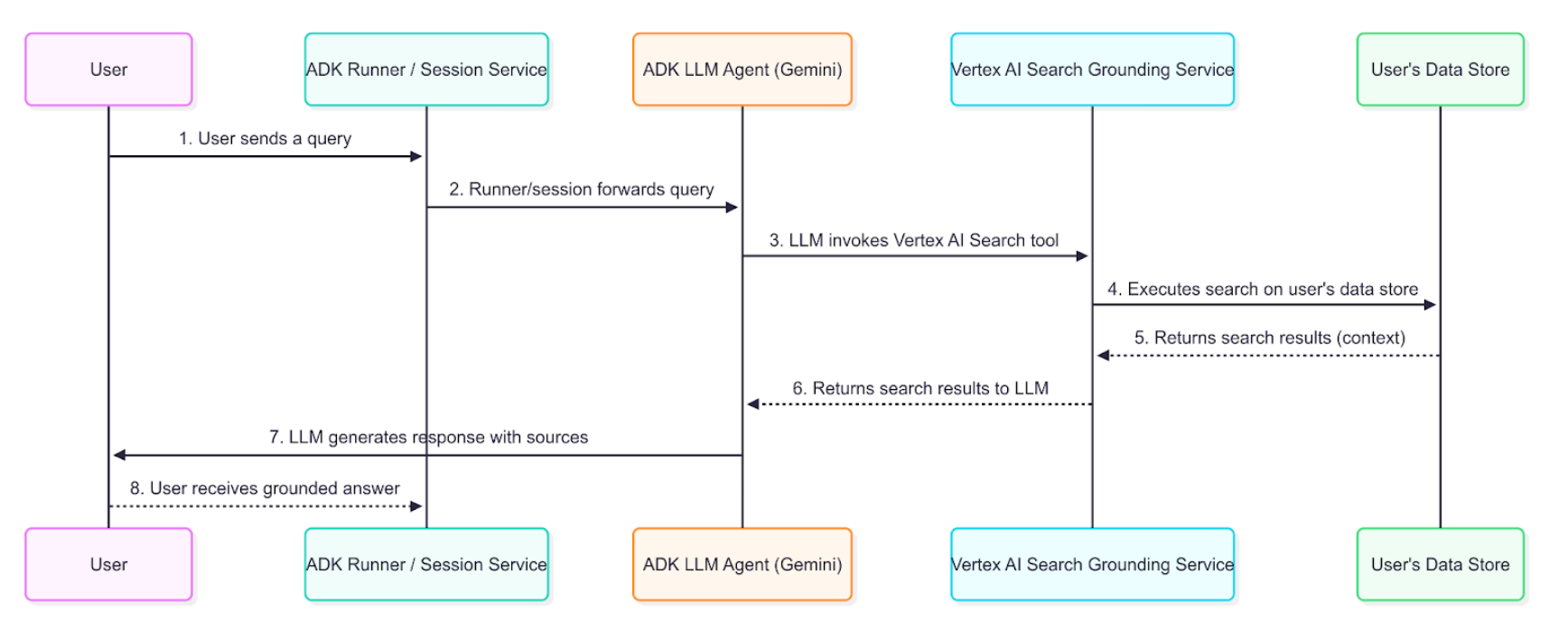
Detailed Description
The grounding agent uses the data flow described in the diagram to retrieve, process, and incorporate enterprise information into the final answer presented to the user.
- User Query: An end-user interacts with your agent by asking a question about internal documents or enterprise data.
- ADK Orchestration: The Agent Development Kit orchestrates the agent's behavior and passes the user's message to the core of your agent.
- LLM Analysis and Tool-Calling: The agent's LLM (e.g., a Gemini model) analyzes the prompt. If it determines that information from your indexed documents is required, it triggers the grounding mechanism by calling the
VertexAiSearchTool. This is ideal for answering queries about company policies, technical documentation, or proprietary research. - Vertex AI Search Service Interaction: The
VertexAiSearchToolinteracts with your configured Vertex AI Search datastore, which contains your indexed enterprise documents. The service formulates and executes search queries against your private content. - Document Retrieval & Ranking: Vertex AI Search retrieves and ranks the most relevant document chunks from your datastore based on semantic similarity and relevance scoring.
- Context Injection: The search service integrates the retrieved document snippets into the model's context before the final response is generated. This crucial step allows the model to "reason" over your organization's factual data.
- Grounded Response Generation: The LLM, now informed by relevant enterprise content, generates a response that incorporates the retrieved information from your documents.
- Response Presentation with Sources: The ADK receives the final grounded response, which includes the necessary source document references and
groundingMetadata, and presents it to the user with attribution. This allows end-users to verify the information against your enterprise sources.
Understanding grounding with Vertex AI Search response
When the agent uses Vertex AI Search to ground a response, it returns detailed information that includes the final text answer and metadata about the documents used to generate that answer. This metadata is crucial for verifying the response and providing attribution to your enterprise sources.
Example of a Grounded Response
The following is an example of the content object returned by the model after a grounded query against enterprise documents.
Final Answer Text:
"Developing models for a medical scribe presents several significant challenges, primarily due to the complex nature of medical documentation, the sensitive data involved, and the demanding requirements of clinical workflows. Key challenges include: **Accuracy and Reliability:** Medical documentation requires extremely high levels of accuracy, as errors can lead to misdiagnoses, incorrect treatments, and legal repercussions. Ensuring that AI models can reliably capture nuanced medical language, distinguish between subjective and objective information, and accurately transcribe physician-patient interactions is a major hurdle. **Natural Language Understanding (NLU) and Speech Recognition:** Medical conversations are often rapid, involve highly specialized jargon, acronyms, and abbreviations, and can be spoken by individuals with diverse accents or speech patterns... [response continues with detailed analysis of privacy, integration, and technical challenges]"
Grounding Metadata Snippet:
{
  "groundingMetadata": {
    "groundingChunks": [
      {
        "document": {
          "title": "AI in Medical Scribing: Technical Challenges",
          "uri": "projects/your-project/locations/global/dataStores/your-datastore-id/documents/doc-medical-scribe-ai-tech-challenges",
          "id": "doc-medical-scribe-ai-tech-challenges"
        }
      },
      {
        "document": {
          "title": "Regulatory and Ethical Hurdles for AI in Healthcare",
          "uri": "projects/your-project/locations/global/dataStores/your-datastore-id/documents/doc-ai-healthcare-ethics",
          "id": "doc-ai-healthcare-ethics"
        }
      }
    ],
    "groundingSupports": [
      {
        "groundingChunkIndices": [0, 1],
        "segment": {
          "endIndex": 637,
          "startIndex": 433,
          "text": "Ensuring that AI models can reliably capture nuanced medical language..."
        }
      }
    ],
    "retrievalQueries": [
      "challenges in natural language processing medical domain",
      "AI medical scribe challenges",
      "difficulties in developing AI for medical scribes"
    ]
  }
}
How to Interpret the Response
The metadata provides a link between the text generated by the model and the enterprise documents that support it. Here is a step-by-step breakdown:
- groundingChunks: This is a list of the enterprise documents the model consulted. Each chunk contains the document
title,uri(document path), andid. - groundingSupports: This list connects specific sentences in the final answer back to the
groundingChunks. - segment: This object identifies a specific portion of the final text answer, defined by its
startIndex,endIndex, and thetextitself. - groundingChunkIndices: This array contains the index numbers that correspond to the sources listed in the
groundingChunks. For example, the text about "HIPAA compliance" is supported by information fromgroundingChunksat index 1 (the "Regulatory and Ethical Hurdles" document). - retrievalQueries: This array shows the specific search queries that were executed against your datastore to find relevant information.
How to display grounding responses with Vertex AI Search
Unlike Google Search grounding, Vertex AI Search grounding does not require specific display components. However, displaying citations and document references builds trust and allows users to verify information against your organization's authoritative sources.
Optional Citation Display
Since grounding metadata is provided, you can choose to implement citation displays based on your application needs:
Simple Text Display (Minimal Implementation):
for (Event event : events) {
    if (event.finalResponse()) {
        System.out.println(event.content().parts().get(0).text());

        // Optional: Show source count
        if (event.groundingMetadata().isPresent()) {
            System.out.println("\nBased on " + event.groundingMetadata().get().groundingChunks().size() + " documents");
        }
    }
}
Enhanced Citation Display (Optional): You can implement interactive citations that show which documents support each statement. The grounding metadata provides all necessary information to map text segments to source documents.
Implementation Considerations
When implementing Vertex AI Search grounding displays:
- Document Access: Verify user permissions for referenced documents
- Simple Integration: Basic text output requires no additional display logic
- Optional Enhancements: Add citations only if your use case benefits from source attribution
- Document Links: Convert document URIs to accessible internal links when needed
- Search Queries: The
retrievalQueriesarray shows what searches were performed against your datastore